







Hama USB-C-dockingstation "Connect2Office Stand", notebook-standaard, 12 poorten
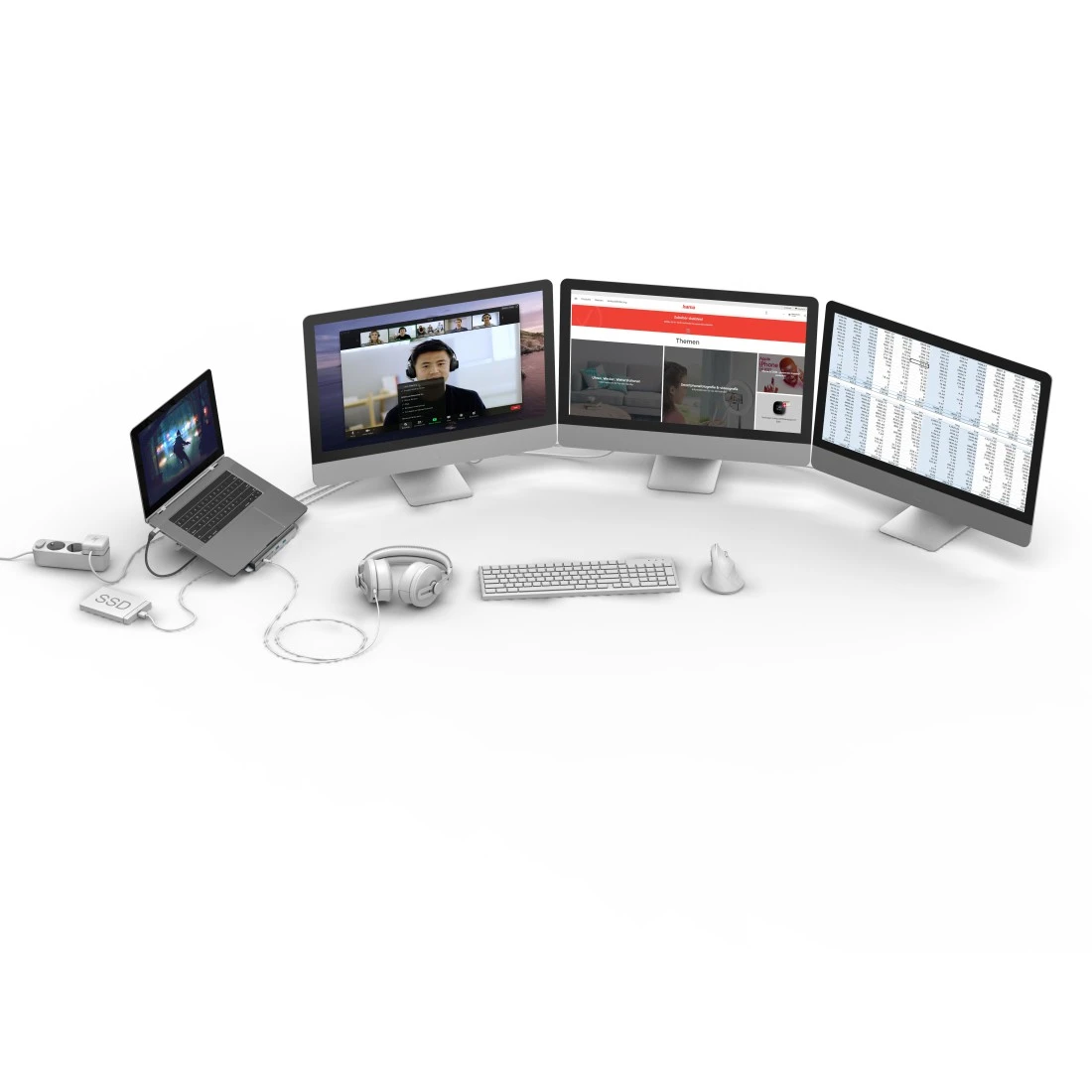
USB-C-hub met 12 aansluitingen als er geen slots zijn op de pc, notebook, MacBook, tablet (of er moet worden uitgebreid) of als er meerdere apparaten centraal moeten worden aangesloten/losgekoppeld via één stekker

Highlights
Super speed Plus data transfer
Super-Speed-Plus-gegevensoverdrachtsnelheid tot max. 10 Gbit/s
USB-C charging + data
USB-C-aansluiting ondersteunt USB-Power-Delivery (USD PD) en snelle gegevensoverdracht
Ultra HD – 4K
Voor perfecte, Ultra-HD-bioscoopkwaliteit met hoge resolutie 4096x2160 (4K) pixels
Multi-stream transport for additional monitors
Met MST (Multi-Stream-Transport) kunt u bijv. drie extra monitoren op de notebook aansluiten en alle vier de schermen tegelijkertijd met verschillende inhouden gebruiken
Gigabit data transfer
Gigabit-ethernet-gegevensoverdracht van maximaal 1 Gbit/s
HiFi stereo sound
Voor een perfecte, hoge resolutie hifi-stereo geluidskwaliteit
Aluminium surface
Hoogwaardige en robuuste aluminium behuizing met fraaie look
Large socket distance
Grote afstand tussen aansluitingen voor het probleemloos aansluiten van brede stekkers
Verbeterde knikbescherming
Verbeterde knikbescherming door flexibele materialen voorkomt kabelbreuk
Excellent transmission quality
Hoogwaardige materialen en afwerking zorgen voor een excellente overdrachtskwaliteit
-
Technische Gegevens
Ontwerp (Kleur, patroon, motief, serie) Kleur Grijs Kleurtoon Antraciet Productlijn Essential Line Kwaliteit Kwaliteit Essential Connectiviteit (connectie) Aansluiting USB-C-plug Aansluitingsdetails 1x 3.5mm-Jack-Audio / 4-pol. / HiFi Stereo/1x DisplayPort / DP 1.4 / max. 4K@60 Hz/1x LAN/Ethernet / Gigabit / max. 1 Gbit/s/1x USB-A / USB 3.2 Gen2 / max. 10 Gbit/s/1x USB-C / Power-Delivery / max. 5-20 V - 5 A - 100 W/2x HDMI™ / High Speed HDMI™ / max. 4K@60 Hz/2x USB-C / USB 3.2 Gen2 / max. 10 Gbit/s/3x USB-A / USB 2.0 / max. 480 Mbit/s Audio Aansluiting 3,5-mm-Jack-Rifle 4 Pin Connectie kabel Geïntegreerd USB-Standaard USB-3.2 Gen 2 Elektro specifieke eigenschappen Max. Aansluitvermogen 100 W Max. Resolutie 4096 x 2160 Netwerksnelheid 10/100/1000 Mbps Oplaadtechnologie Power Delivery Fysieke eigenschappen Aantal Aansluitingen 12 Soort USB-C Docking-Station Grootte & gewicht Breedte (Body) 22 cm Diepte (Body) 24 cm Hoogte (Body) 9,4 cm Kabellengte 0,4 m -
Meer productinformatie
- USB-C-hub met 12 aansluitingen als er geen slots zijn op de pc, notebook, MacBook, tablet (of er moet worden uitgebreid) of als er meerdere apparaten centraal moeten worden aangesloten/losgekoppeld via één stekker
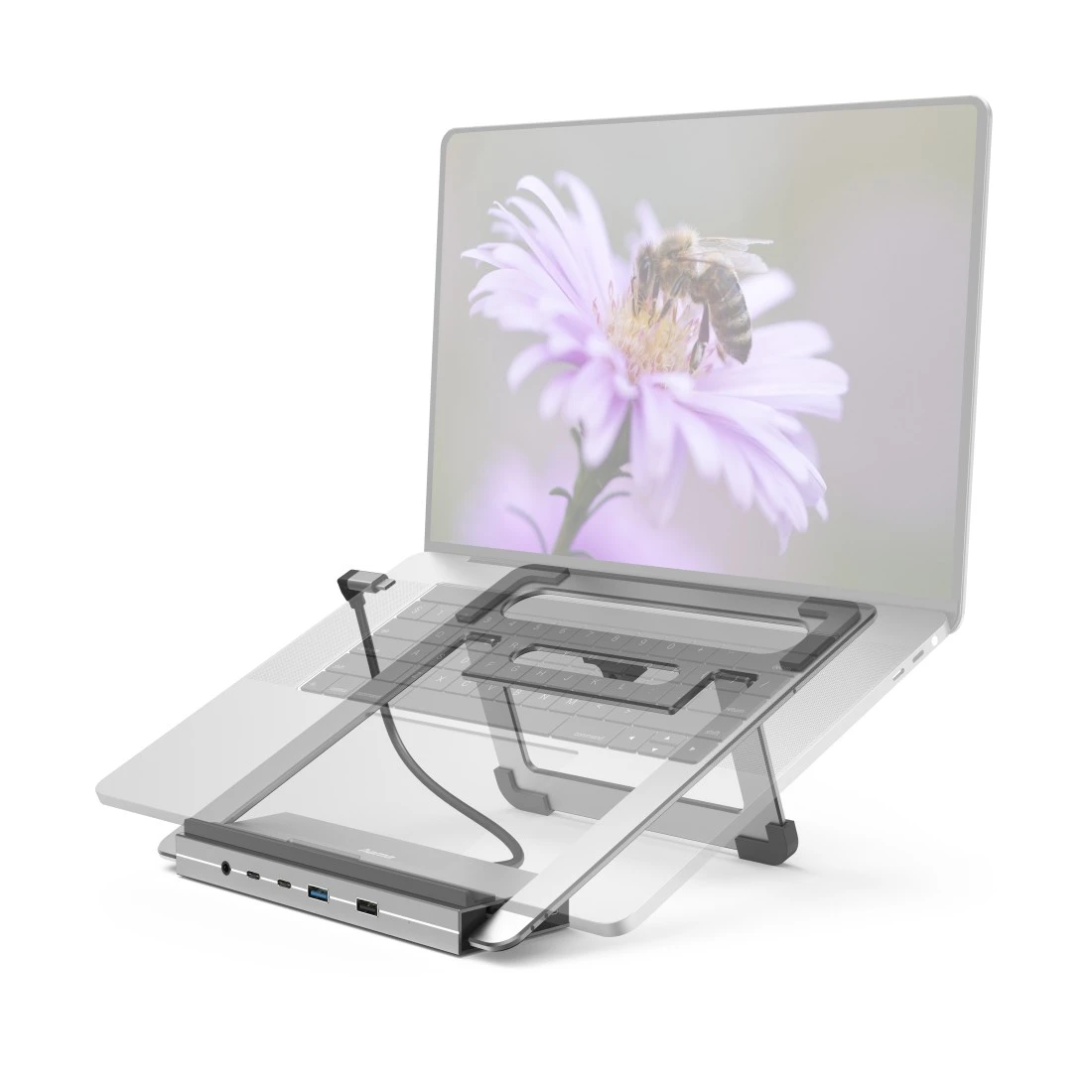
- de USB-C-aansluiting. bevindt zich in het midden van het dockingstation - zo werkt het bij alle notebooks - ongeacht of de USB-C-aansluiting zich links of rechts bevindt
- schuine stand maakt een aangename positie mogelijk voor comfortabel werken aan het bureau of onderweg
- inklapbare notebook-stand voor plaatsbesparend gebruiken of transporteren
- rubberen voetjes voor stevige plaatsing zonder wegglijden
- veilige stand voor laptops tot een formaat van 15.6" (39,62 cm)
- Plug & Play, geen handmatige software-/driver-installatie vereist
- compatibel met Thunderbolt-3/4 (bliksemsymbool)
- voeding via USB
Aansluitingen: - 4x USB-A: voor bijv. externe harde schijf, USB-stick, muis, toetsenbord, printer
- 2x USB- C gegevens: voor bijv. externe harde schijf, USB-stick, muis, toetsenbord, printer
- 1x USB-C power: voor bijv. PD-oplader, PD-netadapter, PD-Power Pack
- 2x HDMI™: voor aansluiting op bijv. monitor, tv, beamer
- 1x DisplayPort: voor aansluiting op bijv. monitor, tv, beamer
- 1x LAN/ethernet: voor bijv. bekabelde internet-netwerkverbindingen
- 1x 3,5-mm-audio/AUX: voor bijv. koptelefoon, headset, luidspreker
-
In de doos
- 1 12in1-USB-C-dockingstation
- 1 gebruiksaanwijzing
-
System Requirements
- besturingssysteem: Windows 11/10/8/7 en Mac OS vanaf 10.8
Voor gebruik van de oplaadfunctie via USB-C moet het apparaat USB-Power-Delivery (USB PD) of Thunderbolt-3/4 ondersteunen.
Voor gebruik van de monitorfunctie via HDMI™ of DisplayPort moet het apparaat DisplayPort Alternate Mode (DP-Alt-Mode), Thunderbolt-3/4 of USB4 ondersteunen.
De MST-functie via HDMI™ of DisplayPort werkt alleen in combinatie met de huidige Microsoft Windows-besturingssystemen.
- besturingssysteem: Windows 11/10/8/7 en Mac OS vanaf 10.8
-
Manufacturer information
Hama GmbH & Co KG, 86652, Monheim, https://hama.com
-
Garantie
Hama GmbH & Co KG geeft de volgende fabrieksgarantie op het vakmanschap en de gebruikte materialen voor het product 00200139 USB-C-dockingstation "Connect2Office Stand", notebook-standaard, 12 poorten: 2 Years Warranty, commercial Usage also
Deze garantie gaat in op de aankoopdatum van dit Hama-product en is geldig in de hele EU.
Als er tijdens de garantieperiode materiaal- of fabricagefouten optreden die als garantieclaim gelden, lost Hama GmbH & Co KG de fout kosteloos op door de goederen te repareren of te vervangen door een product dat Hama GmbH & Co KG als gelijkwaardig beschouwt.
De door ons gegeven garantie is een aanvulling op de wettelijke rechten op kosteloze garantie, waarvoor u zich bij de verkoper van uw product moet wenden. Ook wettelijke rechten die u heeft op kosteloze garantie van ons blijven door deze garantiebelofte onaangetast.
In het geval van een garantieclaim moet u het Hama-product samen met het aankoopbewijs in originele vorm en tegen betaling van de verzendkosten naar het volgende adres sturen:
Hama GmbH & Co KG Dresdner Str. 9 86653 Monheim Duitsland
Als het aankoopbewijs niet wordt bijgevoegd kunnen het verkooppunt en Hama GmbH & Co KG de garantieclaim afwijzen, omdat dit bewijs wordt gebruikt voor de berekening van de garantieperiode.
Bij gebreken die zijn veroorzaakt door geweld of onjuist gebruik, bij reparaties of handelingen door de koper of derden zonder voorafgaande schriftelijke toestemming van Hama GmbH & Co KG, vervalt de garantie.
Schade die niet onder deze garantie valt, kan worden verholpen tegen de kosten van reparatie, hetzij door de dealer die u het product heeft verkocht of door Hama GmbH & Co KG.
Hama GmbH & Co KG, Dresdner Str. 9, 86653 Monheim, 2022
Test results

Outstanding
"User-friendly, ergonomic and practical - the Hama Docking Station 12in1 noticeably enhances every interaction with your own computer."

Recommendation
"If you don't want to have an additional docking station next to the laptop stand and the available connections are sufficient, the Hama 200139 USB-C Docking Station + Notebook Stand is a practical device for compact laptops."

Recommendation
Price/Performance: very good
"Anyone who uses their laptop as a multimedia centre, whether for watching films or in the home office, will love Hama's USB-C docking station Connect2Office Stand. This applies to audio output, the forwarding of 4k video content and the connection of multiple screens, printers or other peripheral devices. They are all connected to the docking station. Meanwhile, all incoming and outgoing signals to and from the laptop are transported via a single USB-C cable. It couldn't be simpler."
FAQs
-
Can I connect 2 or more screens to the MacBook?
The MacBook can only output one additional monitor signal. All other connected monitors display this one additional picture. MST (Multi-Stream-Transport) for connecting several external monitors is only supported by devices with the Windows operating system.
-
Is it a concern that my docking station gets very warm?
The heat development is completely harmless. Due to the aluminium surface, the heat inside the housing of the docking station is efficiently dissipated into the environment.
-
Can I also stream/play movies via the docking station?
Yes, playback on a connected monitor is possible without any problems. However, forwarding the video signal to recording devices is not supported.
-
My laptop does not have a USB-C port. Can I use an adapter?
No, the docking station is only suitable for use with notebooks with USB-C interfaces that meet the USB specifications and system requirements. Adaptations to USB-A or other connections are not possible.
-
Is the docking station compatible with laptops from all manufacturers?
The USB-C docking station is not limited to notebooks from certain manufacturers. However, the device must have a USB-C port that meets the USB specifications and system requirements. To use the notebook stand's charging function, your device must have a USB-C socket with "PowerDelivery" (PD). The easiest way to tell this is that your laptop power supply has a USB-C plug for charging your device.
-
The docking station does not recognise my monitor(s).
Make sure that your computer's USB-C port supports DP™-Alt mode and that all connections are plugged in.
-
Why doesn't the docking station recognise my keyboard?
Check that the keyboard you are using meets the USB specifications and that all connections are secure.
-
Why doesn't the docking station recognise my laptop?
Please check that the notebook meets all system requirements and that all connections are plugged in.
-
Can I close my notebook and only work via the connected devices (monitor, mouse, keyboard)?
Yes, this is possible. The prerequisite for this is that the laptop does not switch off when it is closed. You can set this in the system settings.
-
Does the USB hub recognise all connections after a power failure?
Yes, it may be necessary to restart the notebook.
